Cloud Computing for Startups: A Practical 2026 Guide
August 24, 2026 · 15 min read
Cloud computing for startups is usually framed as a vendor choice. That's the wrong first question. The key question is whether your cloud plan matches your stage, your workload mix, and your credit eligibility, because those three things decide whether infrastructure extends runway or eats it.
AWS's public-cloud era began with milestones that changed startup math, Amazon started its web services branch in 2002, launched Amazon Simple Queue Service in 2004, and formally launched Amazon Web Services in 2006 with EC2 and S3 (Cloudwards history of cloud computing). That shift mattered because founders could rent infrastructure on demand instead of buying servers up front. Once you understand that, the cloud stops looking like procurement and starts looking like a capital-allocation decision.
Table of Contents
- The Cloud Decision for Startups in 2026
- What Cloud Computing Gives a Startup
- How Much Cloud Should a Startup Spend
- Architecture Patterns That Fit an Early-Stage Team
- Cloud and AI Credits Worth Applying For
- Turning Credit Dollars Into Real GPU Hours
- Scaling Infrastructure as Traction Arrives
- Your First Week of Cloud Decisions
The Cloud Decision for Startups in 2026
Most founders obsess over AWS, Google Cloud, or Azure branding. That misses the point. The binding constraint is whether the provider, the credit program, and the workload fit the company's current stage.
Stage beats brand
A seed-stage AI startup with heavy fine-tuning needs is playing a different game from a Series A SaaS team that just wants a stable app stack. The first team should care about GPU access, credit conversion, and whether the grant covers enough usable compute. The second team should care more about deployment speed, managed services, and keeping operations boring.
The other trap is defaulting to the cloud the first engineer already knows. That feels efficient for a week and expensive for a year. If the chosen provider makes it easy to spin up the wrong kind of instance, keep everything in one noisy account, and ignore billing until the board deck, you have picked a liability, not a platform.
Practical rule: pick the cloud like you'd pick a key hire. Fit to the job matters more than prestige.
The market already treats cloud as the baseline. A 2026 snapshot from SystemAdminsPro cloud technology history and market snapshot reported that 48% of organizations planned to migrate at least half of their applications to the cloud in the next year, while 20% intended to move all of them; the same source set measured public-cloud workloads at 63% for SMBs and 54% for enterprises. For startups, that means customers, investors, and hires increasingly expect cloud-native delivery.
Before you pick a logo, compare startup cloud-credit options. Then judge the choice on three axes, stage, workload, and eligibility. If those three do not line up, the “best” cloud on paper becomes the wrong cloud in practice.
What Cloud Computing Gives a Startup
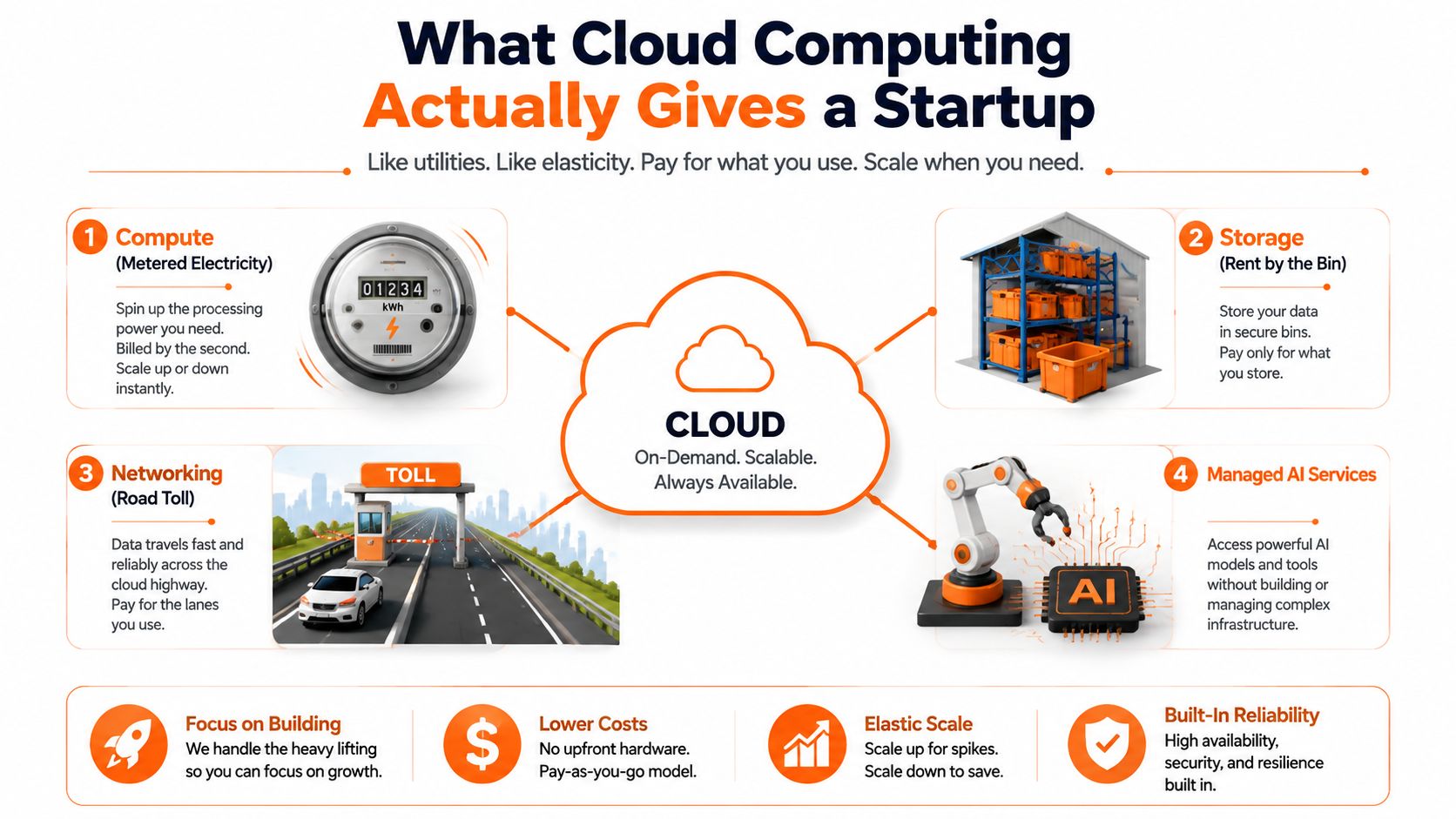
Cloud gives you rented capacity, not ownership. Compute is metered electricity. Storage is a warehouse you rent by the bin. Networking is the toll road. Managed AI services are appliances you do not have to build yourself.
Use the right layer for the job
A bursty training job belongs on temporary compute, not on always-on servers. Object storage is where you keep dataset versions and model checkpoints without tying them to one machine. A managed Postgres database keeps the product stack simpler, and a serverless inference endpoint can make sense on low-traffic days when paying for idle hardware is wasteful.
Managed services matter because they buy back founder time. You are not just paying for silicon, you are paying to skip setup, patching, upgrades, and the late-night debugging that drains a small team's focus. For most early startups, the hidden cost is not the instance bill, it is the engineer waiting while infrastructure gets wired together.
The four levers are instance type, region, commitment, and utilization. Experimental work should use the cheapest acceptable compute and stay disposable. Customer-facing, latency-sensitive workloads should use the setup that keeps response times stable.
Practical rule: elasticity matters more than unit price early on, because a fast deploy beats a cheaper server that nobody has time to configure.
Cloud also gives a startup the ability to match spend to demand instead of buying hardware up front. Public cloud became practical for that reason, and the broader shift is documented in Cloudwards history of cloud computing.
How Much Cloud Should a Startup Spend
Benchmarks matter because vague cloud budgets are how founders fool themselves. Small teams usually spend modestly at the start, but AI can bend the curve fast, and that curve is what drains runway.
Spend should track workload, not ego
Recent benchmark-style reporting says small teams often spend $100-$500 per month on cloud, pre-revenue startups may spend $50-$200 monthly, and growth-stage startups $500-$2,000 monthly (CIODive cloud and AI data center spending spike). Those numbers fit lightweight SaaS. They do not fit an AI-first startup that runs training and inference every day.
Independent reporting also says early-stage AI startups typically spend about $2,000-$8,000 per month in prototype and development, $10,000-$30,000 monthly once real users arrive, and $15,000-$50,000 monthly for research-intensive teams. That is the cost of moving from “can it work?” to “can users rely on it?” and then to “can this handle growth without latency pain?”
| Cloud Spend Benchmarks by Stage and Workload | |||
|---|---|---|---|
| Stage | Workload Type | Typical Monthly Cloud Spend | Key Cost Driver |
| Pre-revenue | Light SaaS | $50-$200 | Basic hosting and low traffic |
| Small team | General startup cloud | $100-$500 | Mostly compute, storage, and egress discipline |
| Growth-stage | SaaS | $500-$2,000 | More users, more environments, more usage |
| Early-stage AI | Prototype and development | $2,000-$8,000 | GPU experimentation and model iteration |
| Early-stage AI | Live users | $10,000-$30,000 | Inference load and concurrency |
| Research-intensive AI | Advanced development | $15,000-$50,000 | Training volume and high-end compute |
If you want a fast sanity check, use this credit savings calculator before you approve the architecture. It helps you see whether credits cover real GPU usage or just delay the bill.
A common mistake is treating cloud cost like a revenue ratio too early for AI products. Before product-market fit, GPU-hour cost per active user and credit runway in months tell you more than revenue share does.
Board-level trigger: if cloud spend rises faster than user count for two straight quarters, stop calling it an engineering detail.
Spend should buy learning, not vanity infrastructure.
Architecture Patterns That Fit an Early-Stage Team
Architecture decides your burn before scale shows up. Pick the wrong setup and you pay twice, once in cloud bills and again in team time.
Start with managed, single-cloud, and separate accounts
At pre-seed and seed, keep the stack tight: one cloud provider, managed services first, and separate environments for dev, staging, and production. If you do not have a platform engineer, every custom layer becomes extra work for the founders and the first developer who inherits the system.
Single-cloud is a control choice. Multi-cloud can look safer, but for a small team it usually means duplicated security work, messier billing, and split attention across two provider consoles. Stay with one cloud until you have a real reason to spread out.
Keep training, inference, and the product stack in separate accounts or projects from day one, even if they sit on the same provider.
Choose the architecture by stage
Seed-stage teams should use managed databases, object storage, and serverless or containerized services only where they reduce maintenance. A Series A team can use containers more deliberately and may keep a second provider in mind for specialized AI work or failover. Later, multi-cloud routing and dedicated inference infrastructure become harder to ignore.
Do not run GPU training in the same account and region as production. Experimental workloads belong elsewhere. Otherwise, billing gets messy and security gets harder to hold together.
Skip Kubernetes unless you need it. For a small team, it often adds ceremony without reducing enough pain.
Architecture choices by startup stage
| Stage | Primary Setup | Compute Model | Multi-Cloud? | Key Caveat |
|---|---|---|---|---|
| Pre-seed | Managed services on one cloud | Serverless or simple containers | No | Avoid premature complexity |
| Seed | One provider, isolated dev and prod | Mix of managed and containerized | Usually no | Keep GPU work separate |
| Series A | Primary cloud with selective specialization | Containers for product, separate AI workloads | Sometimes | Use a secondary option only for a clear reason |
| Series B and later | Multiple environments and dedicated infra | Separate training and inference stacks | Often yes | Add governance before adding more services |
If you want a structured way to judge program fit alongside architecture, StartupFlow AI's credit guidance helps you match what you can qualify for with what your stack needs. The goal is not to maximize provider count. It is to keep the system legible while the team is still small.
Cloud and AI Credits Worth Applying For
Credits are a conversion tool. Their value depends on whether the startup qualifies and can spend them on the right workloads. Founders who chase the biggest headline number first usually waste time on programs they cannot access.
Eligibility decides access
Cloud programs now split between general startup support and AI-specific support. Google Cloud's startup program, for example, differentiates between early startups and AI startups, with up to $350,000 in credits for AI startups versus up to $200,000 for others, and the requirements differ around founding age, funding stage, and prior credits (SpendArk cloud cost benchmark 2026). That gap matters because the larger grant means nothing if your company lands in the wrong tier.
The filter is usually affiliation and stage. Many programs require an accelerator, venture backing, or a specific funding profile, which leaves out bootstrapped teams, founders outside major hubs, and startups that have not raised yet. Spend your application time where approval is plausible.
| Startup Cloud and AI Credit Programs Compared | ||||
|---|---|---|---|---|
| Program | Typical Grant Value | Eligibility Gate | Best Fit Founder | Application Time |
| AWS Activate | Varies by partner path | Usually linked to startup or partner access | Accelerator graduate or partner-backed team | Moderate |
| Google Cloud for Startups | Up to $200,000 or up to $350,000 for AI startups (SpendArk) | Funding and stage rules vary | AI-first team with clean eligibility | Moderate |
| Microsoft for Startups | Varies by program access | Stage and company criteria | Early technical team | Moderate |
| Oracle for Startups | Varies by program access | Company and stage criteria | Infrastructure-sensitive startup | Moderate |
| NVIDIA Inception | Program access varies | AI or ML focus | Model-building team | Moderate |
| Hugging Face Enterprise Hub | Program access varies | AI workflow fit | Team building around open model workflows | Moderate |
For a practical eligibility check, use StartupFlow AI's credit guidance, which matches startups to credit programs they can qualify for. That matters more than a polished program page. If you are going to spend application time, spend it on programs with a credible path to approval.
Apply by speed, not by folklore
Some applications deserve immediate attention because they can shape infrastructure decisions from day one. Others move slowly and should still go in early if they fit. Anything that reads like marketing filler belongs at the bottom of the list unless you have spare bandwidth and a specific use case.
The question is simple. Does the program give you usable compute before your next funding or product milestone? If the answer is no, move on.
Turning Credit Dollars Into Real GPU Hours
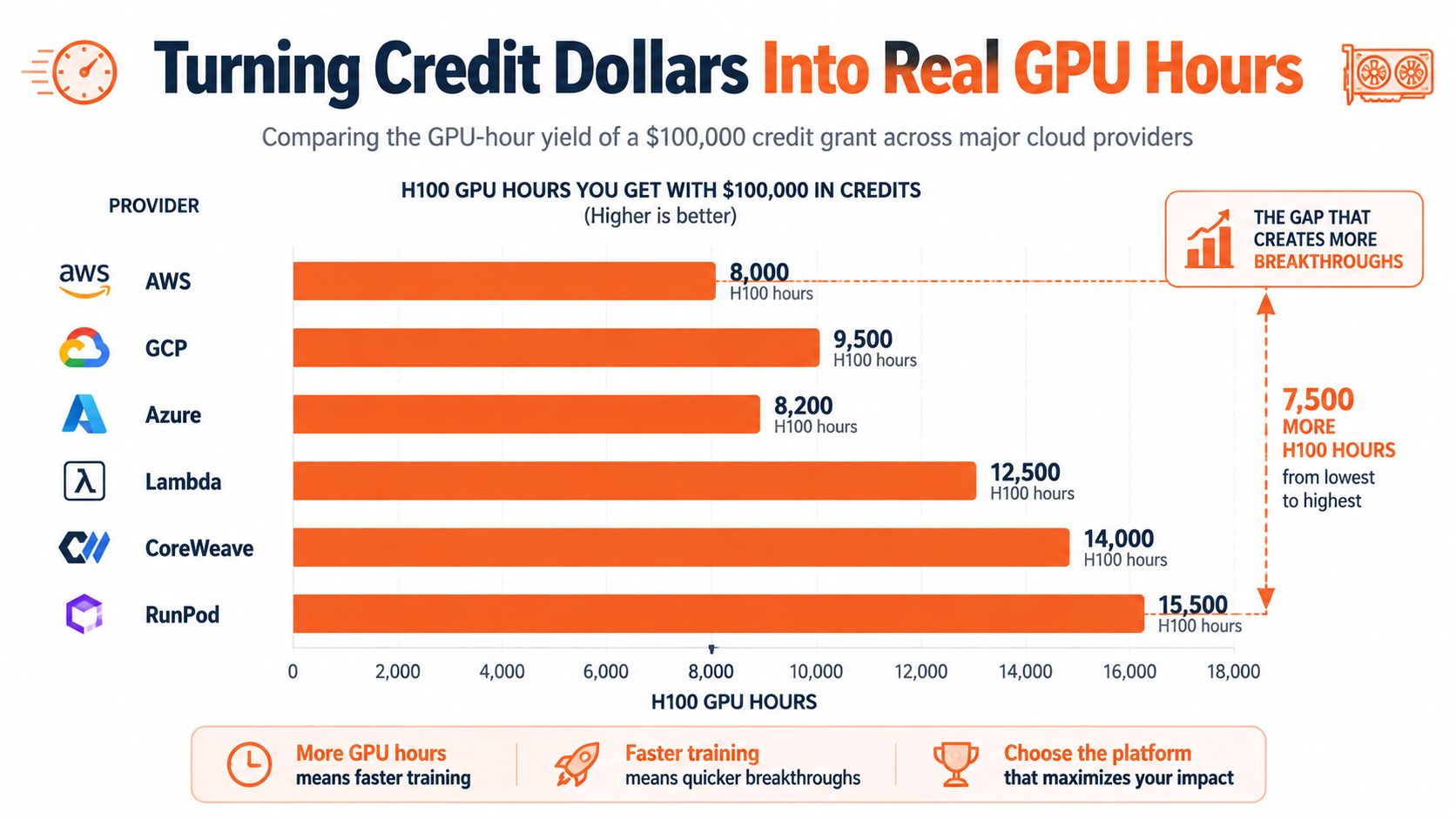
The headline value of a credit grant often overstates what founders can run. GPU-hours are the core metric, because that is what buys experiments, fine-tuning, and inference.
Convert credits into compute, not optimism
A $100,000 credit grant can buy about 25,600 H100 GPU-hours on AWS at roughly $3.90/hour, but about 50,000 GPU-hours on a specialized cloud charging around $2.00/hour (Spheron free GPU cloud credits 2026). Same nominal grant, very different runway. Founders who stop at the face value usually misread what the grant can really support.
Provider rate matters because credits are usually locked to one platform. Workload matters because training, batch inference, and experiment-heavy loops can often live on cheaper infrastructure, while latency-sensitive serving usually cannot. Buy compute after you map the workload, or you will burn the grant on the wrong tier.
Make the grant stretch
The best way to stretch a credit budget is boring engineering discipline. Keep training and inference separate so each uses the right instance class. Checkpoint model runs to cheaper storage, use spot or preemptible pools for batch jobs, and never leave dev environments on always-on GPU instances.
That setup can make the same grant last much longer than a naive one. If you are a pre-seed AI team, the right question is not how large the credit looks. It is how many months of useful iteration it buys.
Rule of thumb: divide usable compute by months of runway, not grant dollars by grant dollars.
If you want one more place to sanity-check provider economics, Lambda's startup GPU cloud directory entry is useful context. Credits are a conversion problem, not a trophy.
Scaling Infrastructure as Traction Arrives
Scaling should follow user behavior, not founder anxiety. If you scale because you're nervous, you'll overbuild. If you wait too long, you'll wake up to outages and angry customers.
Use triggers, not calendar dates
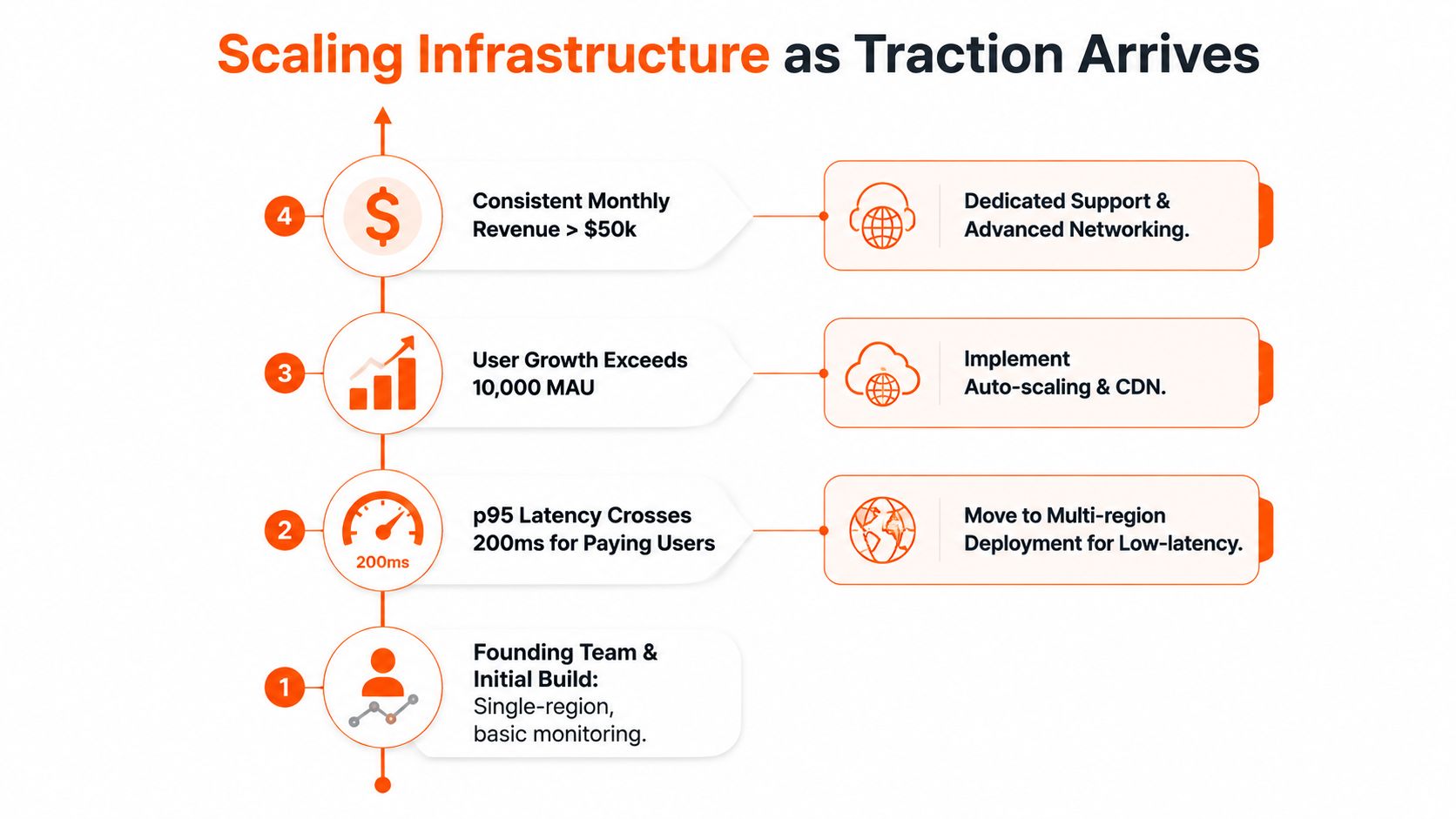
Move from single-region to multi-region when p95 latency crosses 200ms for paying users in a second geography. Move from serverless functions to containerized services when monthly invocations exceed roughly 5 million. Shift from shared GPU inference endpoints to dedicated inference clusters when a single model's QPS pushes past what one accelerator can serve at acceptable latency.
The same discipline applies to training. Once retraining cycles drop below weekly, monolithic jobs become a bottleneck and you should start orchestrating the pipeline. That doesn't mean building a giant MLOps stack on day one. It means stop forcing one-off scripts to behave like production systems.
Tie spending to a review loop
When cloud spend crosses 40% of ARR, require a FinOps review and a reserved-instance commitment before adding new workloads (GMI Cloud GPU cloud platform costs for AI startups in 2026). That's not a warning label, that's a governance threshold. If the bill is eating that much of the business, the founders need to change the operating model, not just buy another service.
| Stage Signal | Infrastructure Change | Why It Matters |
|---|---|---|
| First geography starts to lag | Add multi-region support | Reduces latency for paying users |
| Usage becomes heavy and steady | Move from functions to containers | Gives more control and predictability |
| One model saturates a GPU | Dedicated inference cluster | Protects latency and throughput |
| Retraining becomes frequent | Orchestrated pipeline | Lowers manual ops and failure risk |
| Spend crosses cost ceiling | FinOps review and commitment | Forces discipline before expansion |
I'd use CloudZero's startup credit directory entry only as part of a broader cost-control review, not as a substitute for one. The point is to decide by signal. Review your architecture every 90 days, and tie the meeting to the next traction milestone so scaling becomes a business decision, not a panic response.
Your First Week of Cloud Decisions
The fastest way to stop bleeding runway is to make the cloud call in seven days, not seven months. You do not need perfect architecture. You need one owner, a clean eligibility map, and billing that will not blindside you.
A week is enough to get disciplined
Day 1: split workloads into compute, storage, and AI inference, then assign one owner to each. Day 2: check eligibility across AWS Activate, Google Cloud for Startups, Microsoft for Startups, and NVIDIA Inception in one spreadsheet. Day 3: convert each grant into GPU-hours and estimate how many months of runway it buys.
Day 4: choose the primary cloud by workload fit, not habit, then lock in one region and one account structure. Day 5: deploy a minimal reference stack with dev, staging, and production separated. Day 6: tag every resource by project and environment, turn on cost anomaly alerts, and set a hard spend cap.
Day 7: schedule the next 90-day architecture review and tie it to the next traction milestone. That keeps infrastructure decisions tied to the business, not to whoever shouted loudest in Slack this week.
The founder's checklist
If you cannot explain what the grant buys in GPU-hours, you do not understand the grant.
Use StartupFlow AI for the eligibility work if you want the matching process done faster. It maps a startup profile to credit programs, accelerators, and related options, then explains the match in plain language. The point is not collecting logos. The point is choosing the setup that keeps you alive long enough to earn product-market fit.